
If you advertise on Facebook and want to track visitors to your booking page, build remarketing audiences, or create lookalike audiences, connecting Bookablesites with Facebook Business is the right solution.
Link your Bookablesites account to your Facebook Business account to enable these capabilities.
The Facebook Pixel integration for Bookablesites is free and does not count toward your allotment of Custom Features & Integrations.
To turn it on, go to Features & Integrations in Bookablesites, find “Facebook Pixel,” and click “Enable.”
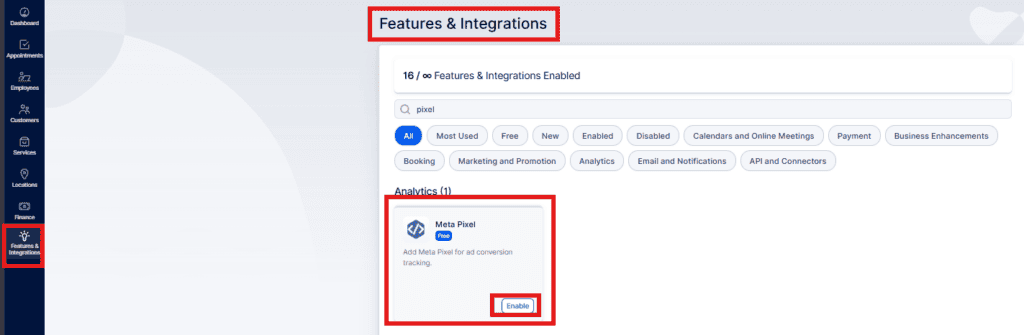
After activating the integration, the card will reload and show a “Set Up” button. Click it to open the setup page, which explains how to locate your Facebook ID. Once you have the ID, paste it into the provided field as shown.
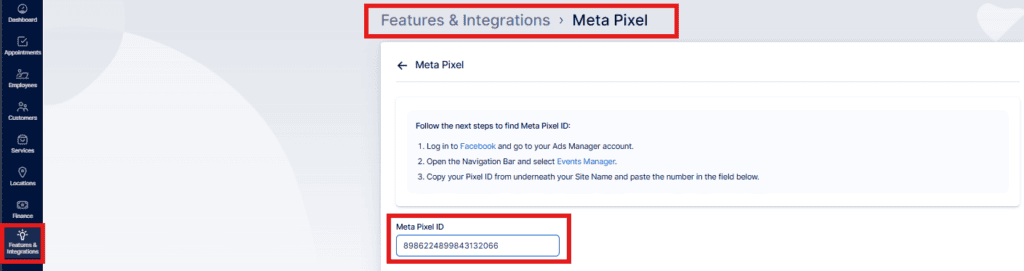
After entering your Facebook ID, click “Save Changes” at the bottom of the page to finalize the connection between your Facebook Ads account and your Bookablesites account.
Once enabled, this feature lets you track visitors who come from Facebook ads to your Bookablesites booking page, build remarketing audiences, and create lookalike audiences for more targeted advertising.