
features
Features
Access a wide range of features and integrations to streamline bookings, payments, notifications, and calendar sync for your software. Easily connect with third-party tools to automate tasks and provide a smooth experience for both you and your clients.
business management
Your Complete Booking Dashboard
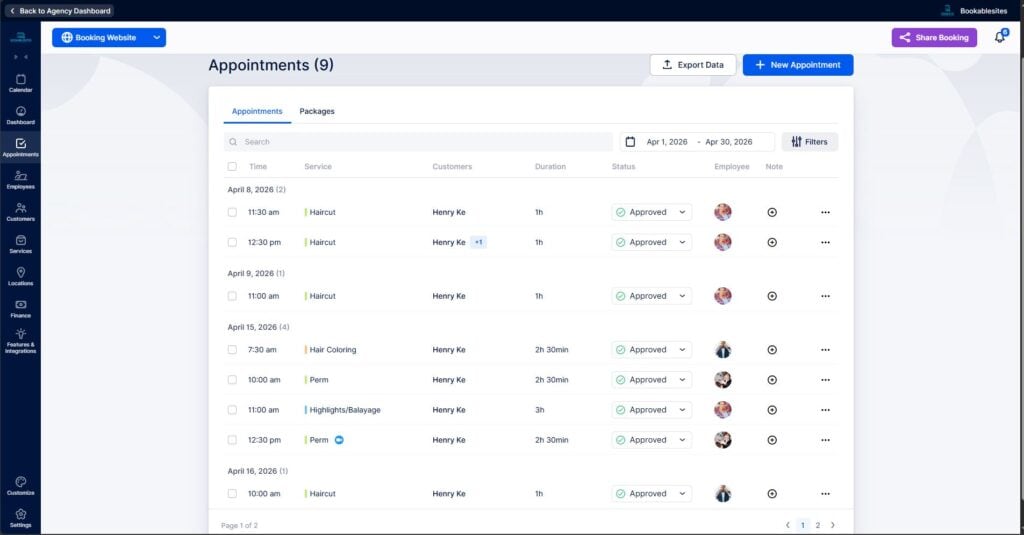
Take control of your day with a centralized dashboard that puts your schedule at your fingertips. Easily manage upcoming appointments, track staff performance, and monitor your daily revenue all from one intuitive interface.
actionable insights
Track Your Growth & Performance
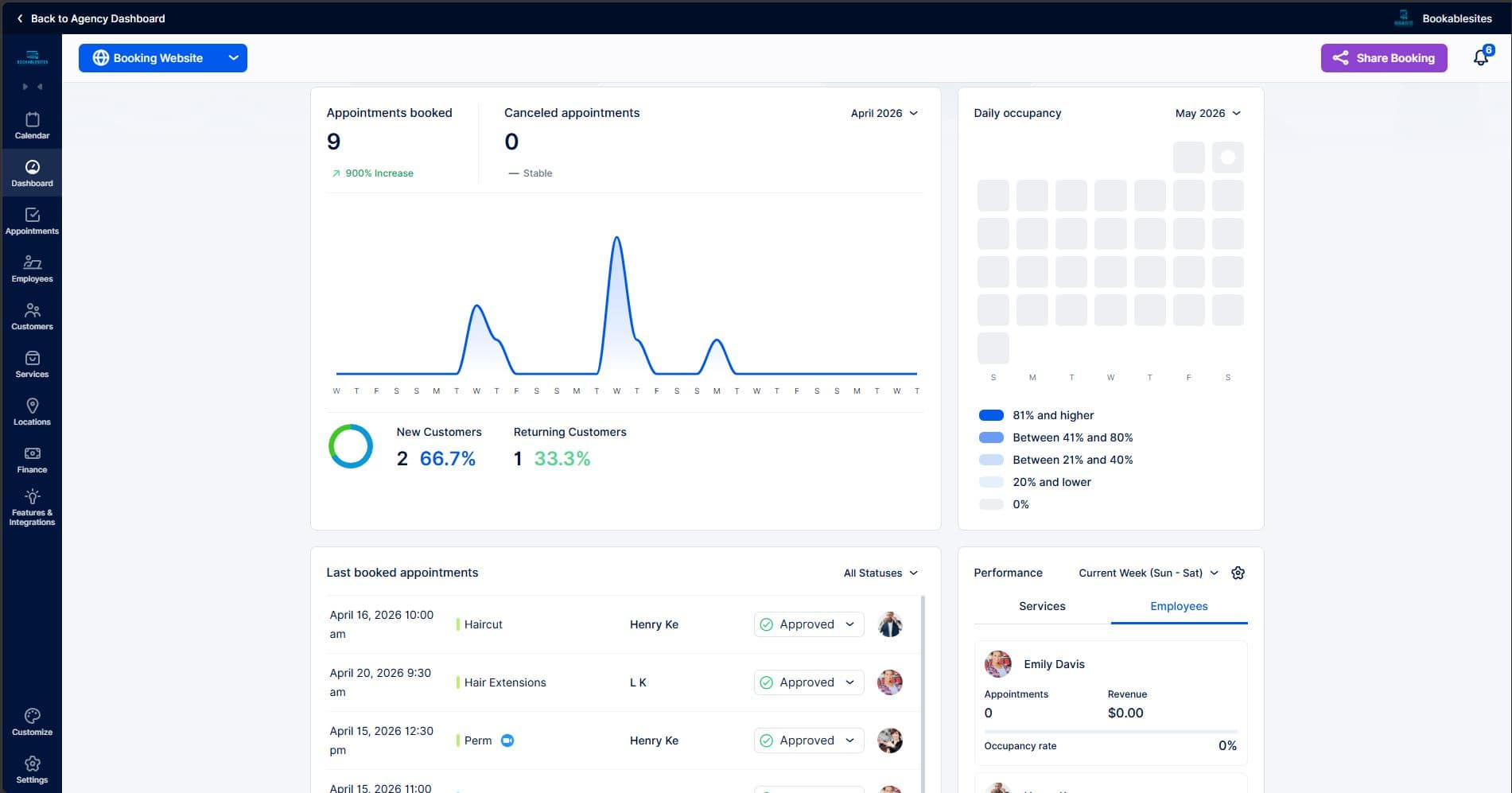
Make data-driven decisions to grow your business. Our powerful reporting tools give you instant insights into your most popular services, peak booking hours, and staff utilization rates, helping you maximize your revenue.
ease of use
Launch Your Booking Page in Minutes
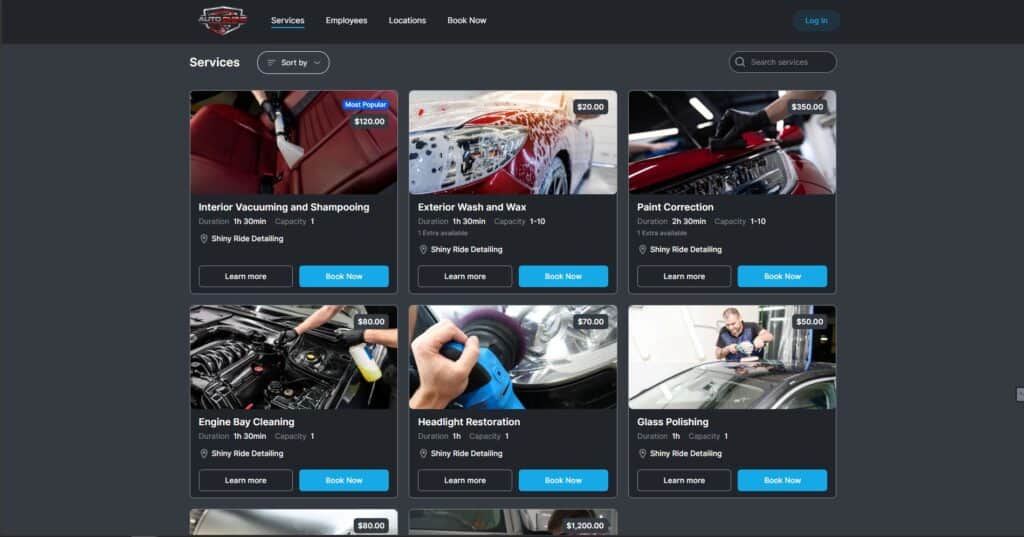
Say goodbye to complex setups. Create a stunning, custom-branded booking website without writing a single line of code. Let your clients easily self-book available time slots 24/7 from any device.
important opinion
Booking Site and Form Builder
Create a branded booking site without coding and customize every part of the form—fields, steps, and design—to fit your needs. Embed it on your website or share the link so clients can schedule in minutes.
A Booking Website
A booking website showcases a sleek, customizable booking websites that lets businesses display services, staff, locations, and real‑time availability with branded pages and easy navigation.
Custom Domains
Connect your custom domain (e.g., bookings.yourbrand.com) by adding Bookablesites’ DNS records and selecting it in settings. After DNS propagates and verifies, your booking site runs on your branded URL with automatic SSL.
Share Appointments
On the Appointments page, there’s a “Share Booking Form” button that lets you quickly send the booking form to your customers.
Customizable Booking Forms or Pages
Select from a variety of booking page themes and personalize the design. You can also reorder the steps in the booking form and translate it into different languages.
Embeddable Booking Forms
If you already have a website, you can quickly embed a booking form on any page with an iframe, letting clients schedule appointments right on your site.
Customer Profiles
Clients can create profiles by clicking the Login button in the top-right corner of your booking site. From their profile, they can easily manage their appointments.
Add Appointments to Customers’ Calendars
After booking, customers can quickly add the appointment to their calendar by clicking the “Add to calendar” button. It will be automatically added to Google, Outlook, or iCal.
Custom Fields (Intake Forms)
Collect extra details during booking by setting up custom fields (intake forms) for appointments and customers. You can pick from several input types: Text, Text Area, Text Content, Select Box, Checkbox, Radio Button, Date Picker, Address, and Attachment.
Share Time Slots/Dates via Email
Email your available dates and time slots to customers.
Auto-Detect Time Zones
Bookablesites reads the customer’s computer time zone, so available slots show in their local time. You’ll still see the slots in your own time zone.
Templates for the Booking Pages
Choose from eight preset themes in light or dark, and customize with primary/background colors, patterns, fonts, and element styles. This ensures the look and feel match your brand.
Share Time Slots/Dates via Social Media
Pick your available dates and time slots, then generate an image you can share on social media to attract more bookings.
important opinion
User Admin & Employee Management
Manage users, roles, and permissions in one place, and keep staff details, availability, and workloads up to date. Assign services, set working hours, and track performance to keep your team organized and efficient.
Admin Page & Calendar View
The Admin page is available to account owners and employees based on role settings. Admins can also view all bookings, with employee breakdowns shown in the overview calendar.
Insightful Dashboard
The KPI Dashboard gives a clear view of your business performance. Widgets show key metrics like new customers, revenue for a selected period, employee occupancy, daily occupancy, and other data essential for success.
Custom Roles
Create and manage different employee roles. Control which pages and actions each user can access, and set clear permission levels and management tiers across your team.
Unlimited Customers
Admins and employees can easily manage customers, update their details, monitor loyal clients, and import or export customer lists.
Employee Commission
This feature makes calculating employee payouts easy and efficient. Set global payout rules or customize commission rates for individual employees.
Resources
Set up resources such as rooms, equipment, vehicles, or other limited assets to be shared among employees, services, or locations. If a resource isn’t available, Bookablesites will automatically block that time slot on your booking form.
Special Days for Employees
The special days feature lets you set custom work hours for specific employees on selected dates. This temporarily overrides their regular schedules, giving you added flexibility.
SMS and Email Notifications
Personalize and adjust email and SMS notifications for various events, like upcoming appointments, follow-ups, and status updates.
Taxes
From the admin dashboard, you can quickly create and manage taxes for your service prices. Choose to add taxes on top of the price or include them within it, and decide if the tax should be set as default, applied to all services, or to all extras.
Invoices
Export invoices or send them straight to customers after they complete a payment. Pick from four invoice templates, customize with your logo and colors, and set details like the invoice title and number. The invoice page gives you a complete list of all transactions in Bookablesites.
Company Days Off
Set company-wide days off that automatically apply to all employees.
Employees Time Zone
Each team member can set their preferred time zone in the platform, making collaboration and scheduling smooth for everyone.
important opinion
Appointments
Let readers easily schedule appointments to visit, pick up, or discuss books through your website. The appointment feature streamlines booking times, confirmations, and reminders for a smooth experience.
Managing Appointments
The admin page lets you quickly create, view, and update appointments, including adjusting their status. You can also export appointment or customer data with just a few clicks.
Recurring Appointments
The Recurring Appointments option allows customers to schedule appointments that happen regularly. They pick the initial date and time, choose how often the appointment should repeat, and set how many times it should occur, all at once.
Rescheduling and Canceling
Customer profiles and email alerts make it easy for users to change or cancel their appointments quickly online. This helps lower the chances of missed appointments and keeps scheduling organized.
Group Booking
When hosting group sessions, Bookablesites lets you set the minimum and maximum number of participants for each appointment, making group bookings straightforward and efficient.
Multiple Services
Bookablesites makes it simple to organize various services and categories. You can easily adjust settings like design, location, length, cost, taxes, and create private services tailored for special requirements..
Additional Upselling
You can offer add-ons to your current services to give clients more options and boost sales. These add-ons may lengthen the appointment, raise the cost, or be included at no charge without changing the scheduled time.
Multiple Locations
Bookablesites makes it easy to oversee operations at different locations, whether they’re in separate cities or time zones. You can manage every site from one platform, and staff can work across multiple locations as needed.
Deposit Payment
If you set up deposit payments, customers pay part of the fee upfront when booking and settle the rest at the appointment. Bookablesites lets you choose between fixed or adjustable deposit amounts, and you can enable deposits for every service or just specific ones.
Refund Payment
Boost reservations and strengthen customer confidence by providing refunds if an appointment is canceled.
Coupons
Bookablesites makes it easy to give your customers discounts or complimentary appointments. Just set the value for each coupon to offer special promotions.
Appointment Notes
Include remarks for any appointment and keep all related information together for easy access.
Packages
Bundle several services into one package to encourage more purchases. You can customize prices, control how often each offer can be used, and set when it’s available. This works well for special promotions or deals with multiple sessions, all managed from your Trafft dashboard.
Ready to Start?
Lorem ipsum dolor sit amet, consectetur adipiscing elit. Ut elit tellus, luctus nec ullamcorper mattis, pulvinar dapibus leo.